PU 508 | 507 (Globe+): Singapore e-Invoicing supports PEPPOL BIS 3.0 format (Singaporean legislation)
Exact Globe+ now supports the manual generation of Singapore PEPPOL BIS Billing 3.0 e-Invoice XML files for sales invoices and sales credit notes. This new functionality supports both domestic and foreign debtors. This also allows you to generate e-Invoices that are compliant during the invoice finalisation process.
System settings
The E-mail and UEN number fields have been added at . The E-mail field is to store the email address of the company and the UEN number field is to store the Singapore UEN number of the company.
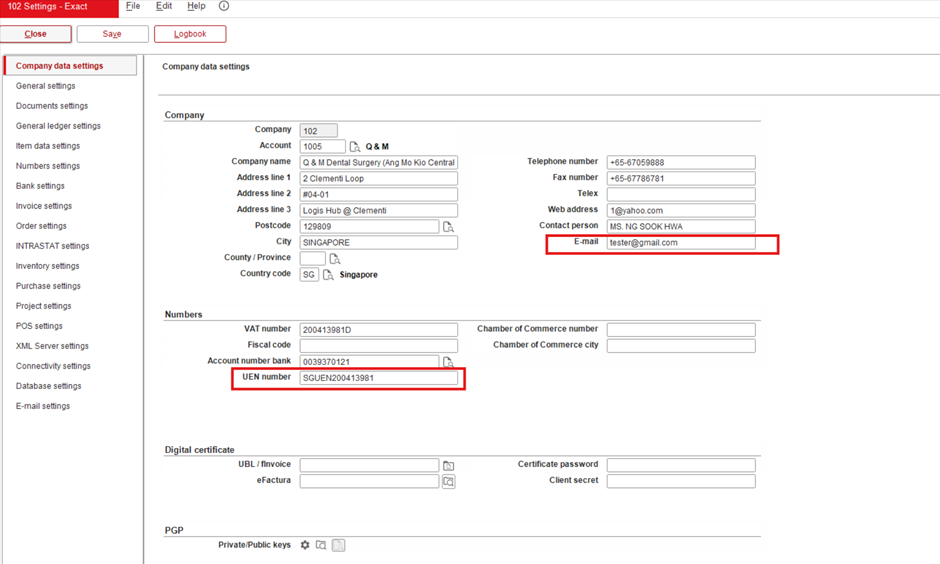
If the email of the main contact person of the company account is not defined, the email field will be used for the generated e-Invoice XML content at <cbc:ElectronicMail> of <cac:AccountingSupplierParty>.
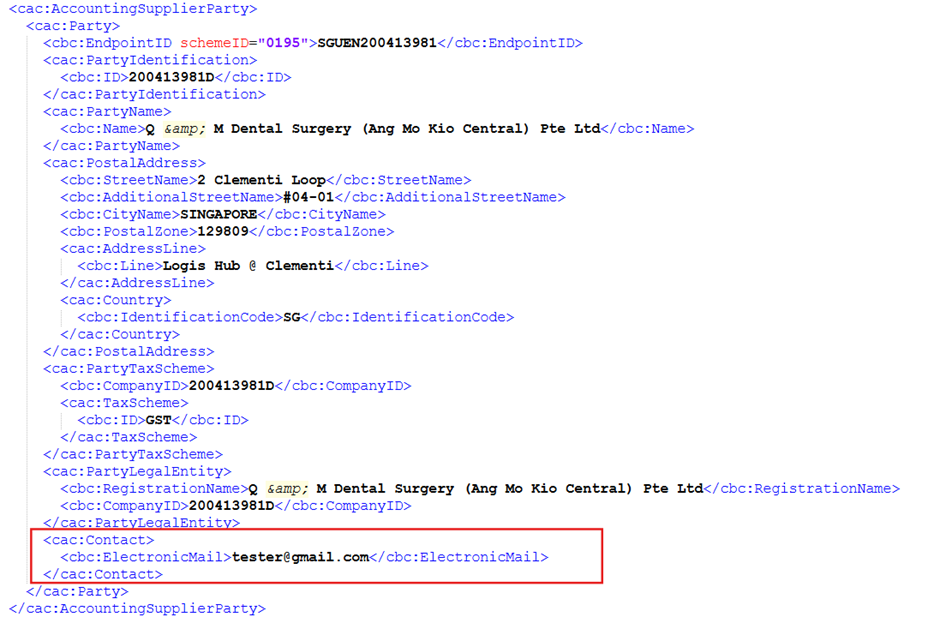
The UEN number will be used for the value at <cbc:EndpointID> in the XML file for the supplier party and the SchemeID is defaulted to “0195”.
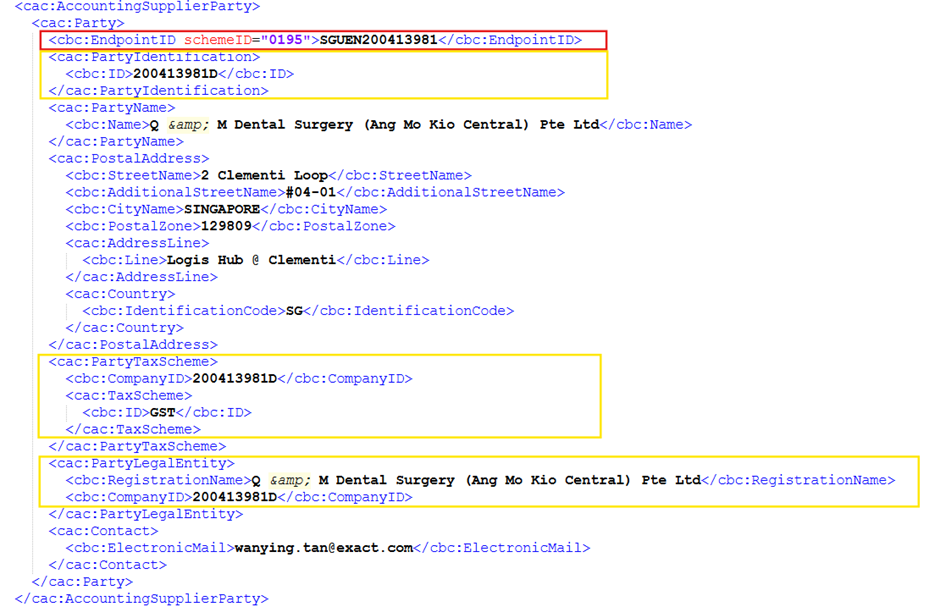
The existing VAT number field will be used for the values at <cac:PartyIdentification>/<cbc:ID>, <cac:PartyTaxScheme>/<cbc:CompanyID>, and <cac:PartyLegalEntity>/<cbc:CompanyID> of the supplier details at <cac:AccountingSupplierParty>.
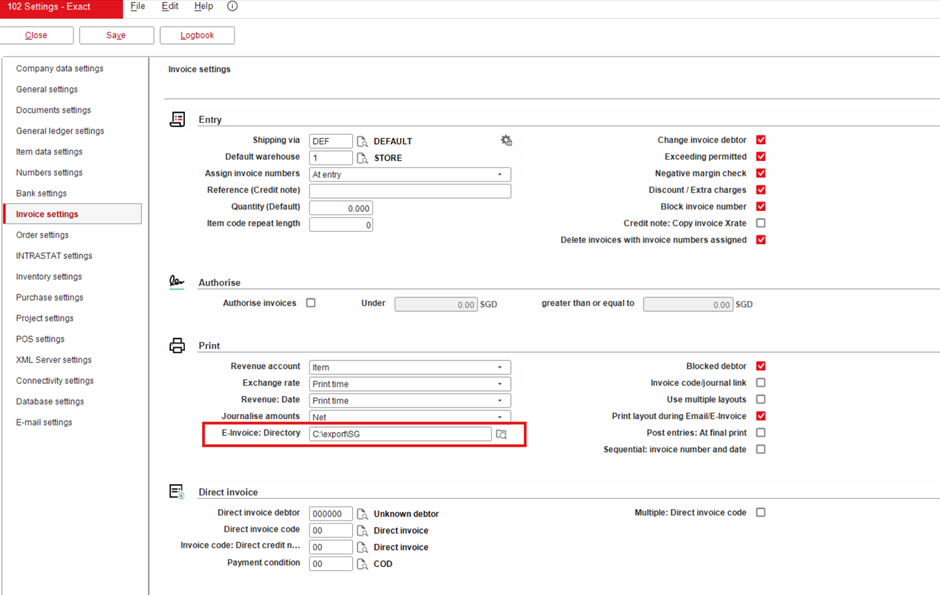
The E-Invoice: Directory field has been added at . This field is mandatory for the final process of the invoice. The generated XML and PDF files will be stored in the directory that you have defined in this field.
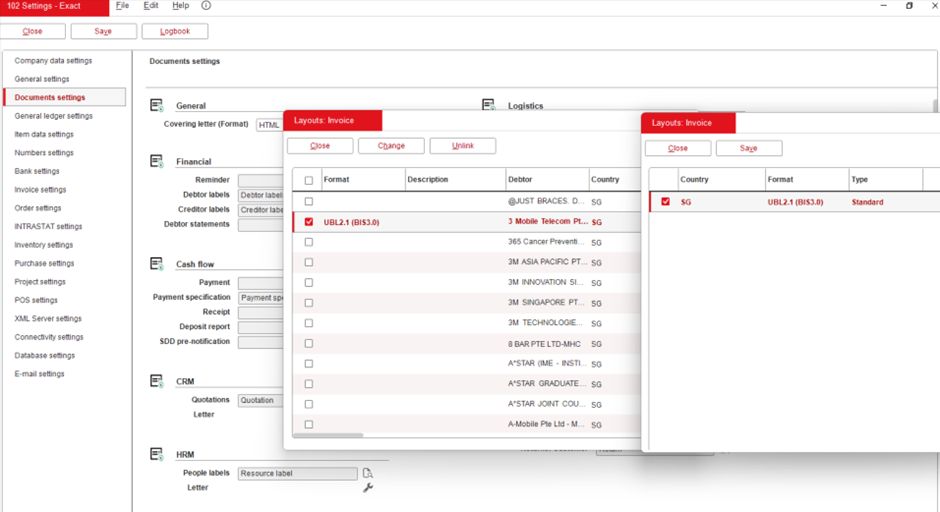
The UBL2.1-BIS3.0 layout has been added for the Singapore invoice debtor at . This layout is used to generate the new e-Invoice format UBL 3.1.
Tax code maintenance
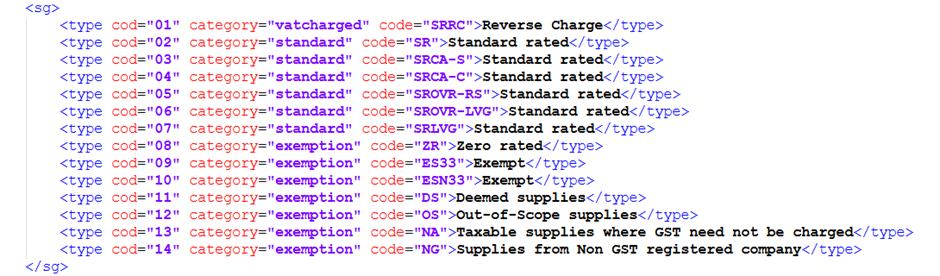
The tax category lists will be stored in the TaxNature.xml file. The three categories for the nature lists are:
- Standard
- Exemption
- VATCharged
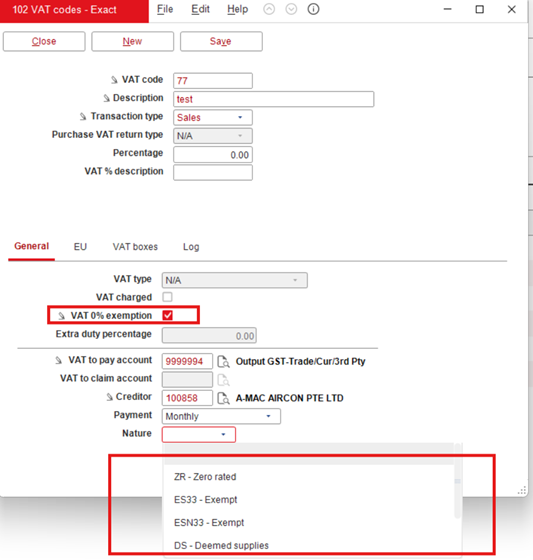
The Nature list is available at . If VAT 0% exemption is selected, the tax category list will show the options of the Exemption category defined in the TaxNature.xml file such as the following:
- ZR
- ES33
- ESN33
- DS
- OS
- NA
- NG
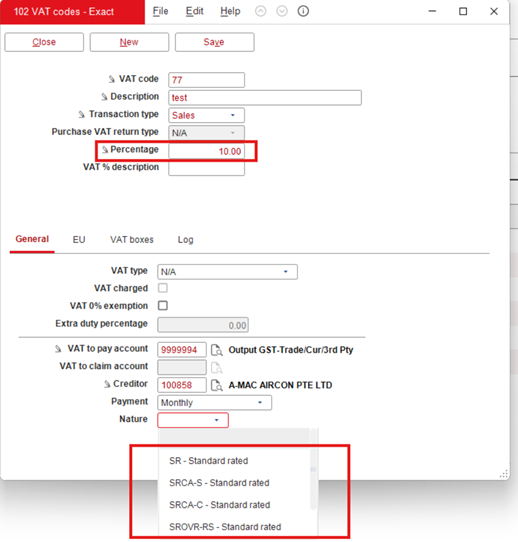
If the VAT percentage is greater than 0, the tax category list will show the options of the Standard category defined in the TaxNature.xml file, such as the following:
- SR
- SRCA-S
- SRCA-C
- SROVR-RS
- SROVR-LVG
- SRLVG
If the VAT charged is selected, the tax category will show the options of the VATCharged category defined in the TaxNature.xml file which is SRRC.
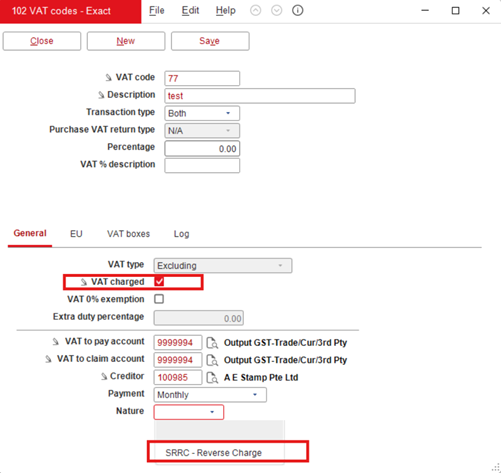
- If the Nature of the tax is not defined, the default value of the tax category will be based on the status of the VAT percentage, VAT charged, and VAT 0% exemption, such as the following:
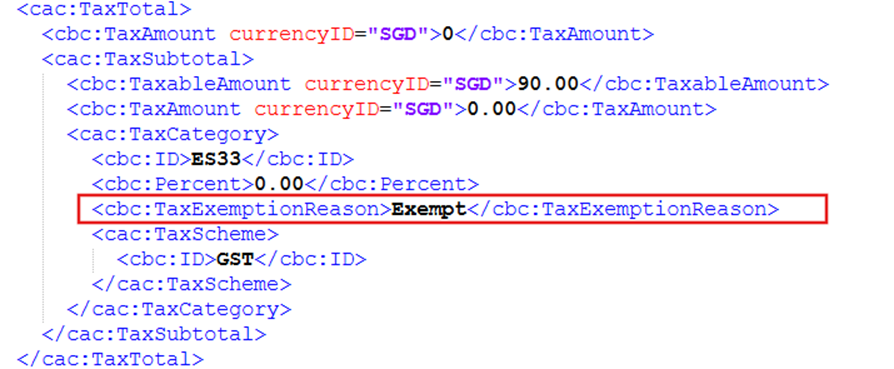
- If VAT 0% exemption is selected, ES33 will be used.
- If VAT Percentage is 0 and VAT charged is not selected, ZR will be used.
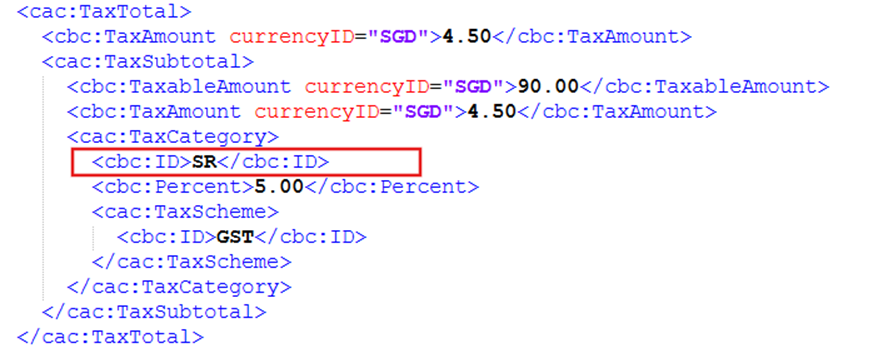
- If VAT Percentage is greater than 0, SR will be used.
- If VAT charged is selected, SRRC will be used.
The defined or default tax category code will be displayed under <cac:TaxCategory>/<cbc:ID>. This block is generated by grouping the tax data based on the tax percentage and tax nature.
If the tax nature is ES33 or ESN33, a tag in <cac:TaxCategory>/<cbc:TaxExemptionReason> will be generated, and the value for this tag will be defaulted to Exempt.
Invoice process
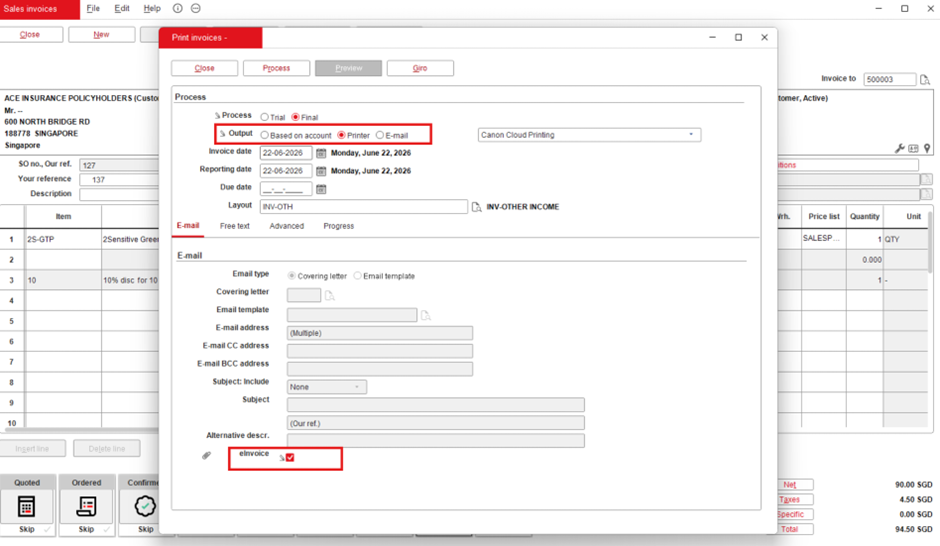
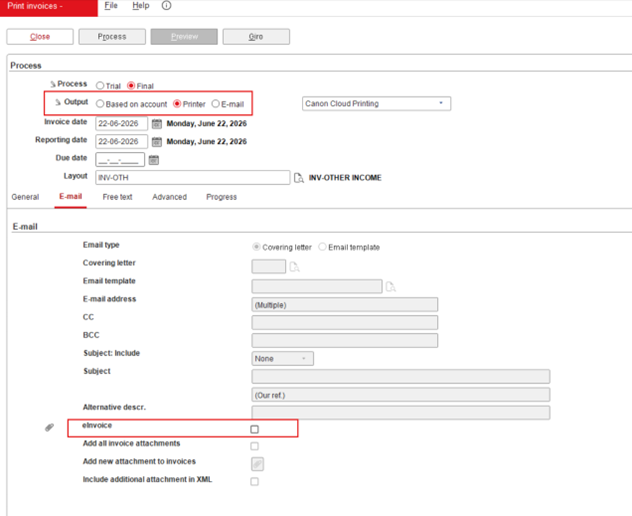
The Printer option at Output and the EInvoice checkbox will be selected by default at and .
Debtor and creditor maintenance
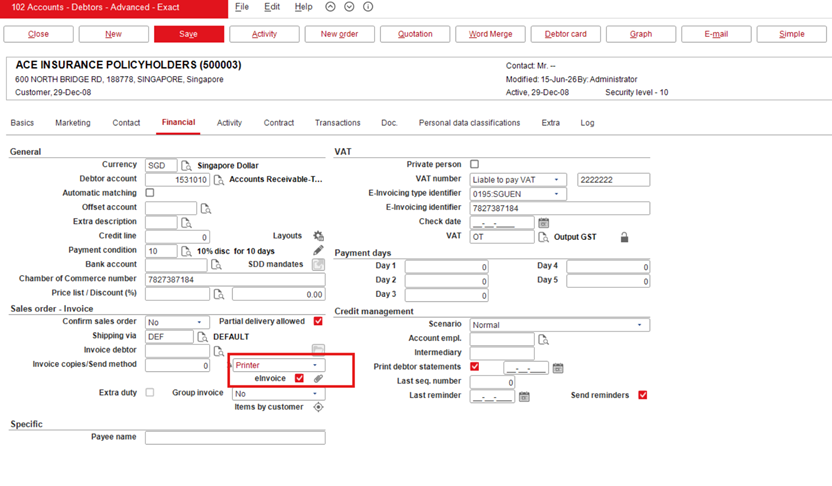
By default, the Printer option will be displayed at Send method and the e-Invoice checkbox is selected under the Financial tab at . The eInvoice checkbox in the debtor maintenance will be automatically reflected in the invoice process screen if a single invoice is processed at .
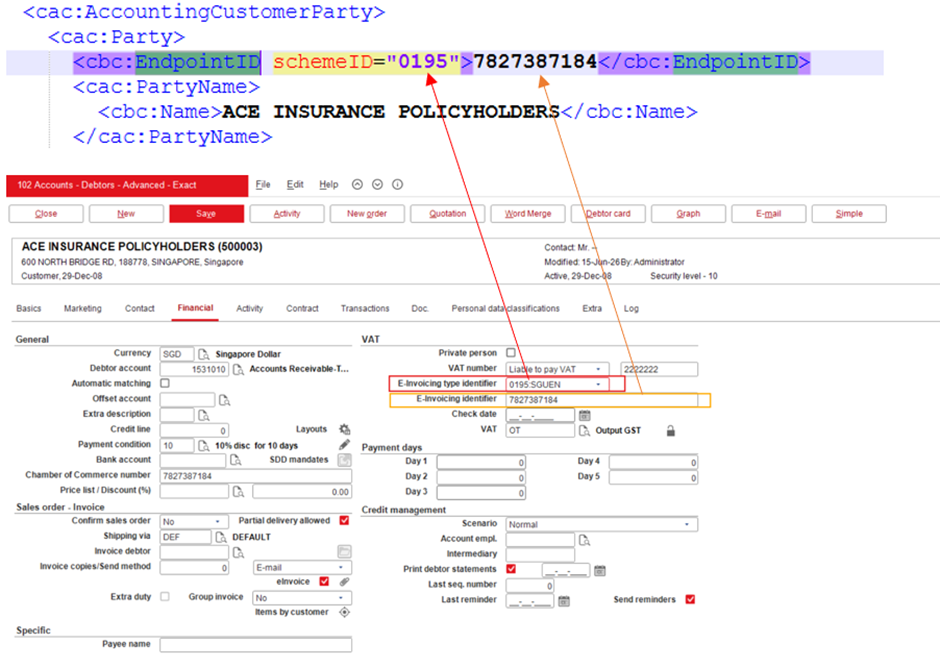
The E-Invoicing type identifier and E-Invoicing identifier fields have been added under the Financial tab at and . The Tax exemption number field has been renamed to E-Invoicing identifier.
The E-Invoicing type identifier field will contain the 0195:SGUEN and 0088:GLN options. These options will be available for Singapore domestic debtor and foreign debtor without existing identifier type. The identifier type selected will be shown as the scheme ID at the <cac:AccountingCustomerParty>/<cac:Party>/<cbc:EndpointID> tag in the generated e-Invoice XML file.
The value for <cbc:Endpoint> will be derived from the E-Invoicing identifier field.
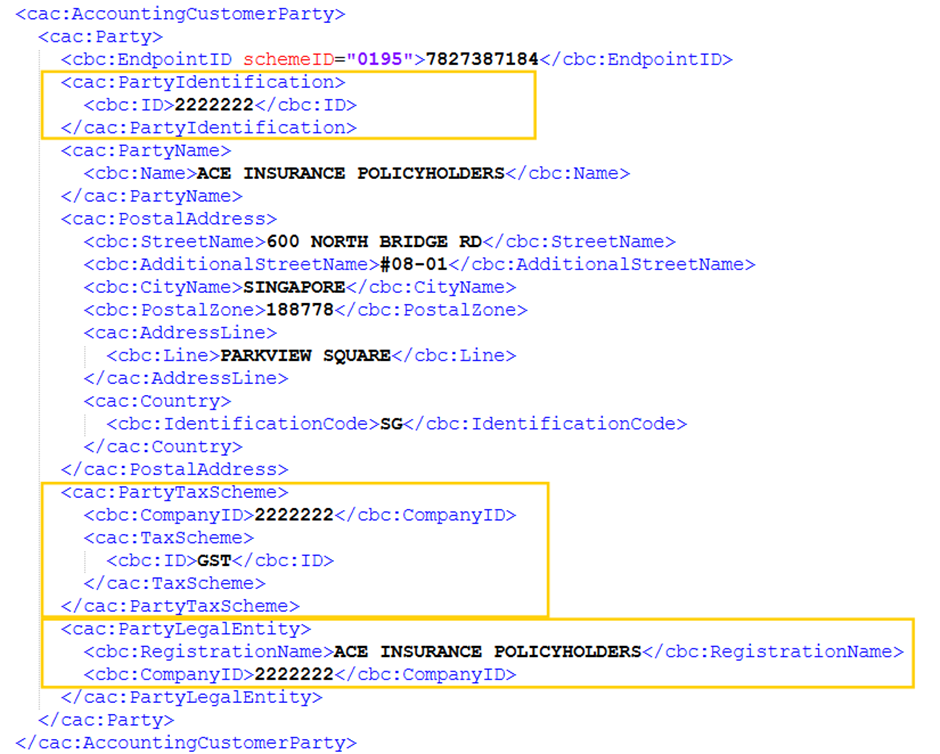
The E-Invoicing identifier type dropdown list will be blank if you did not select any identifier type and the <cbc:EndpointID> tag will not be displayed in the generated e-Invoice XML file.
Payment term code
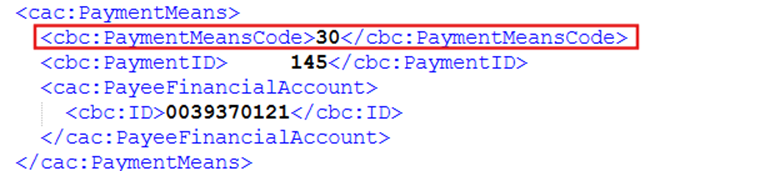
The payment method can be defined in the Conditions screen at . The following payment term codes are used to support the tag in <cac:PaymentMeans>/<cbc:PaymentMeansCode>:
| No
|
Code
|
Abbreviation
|
Description
|
BankTransactions
.PaymentType
|
SEPA
|
| 01 |
20 |
Cheque |
Payment by a pre-printed form on which instructions are given to an account holder (a bank or building society) to pay a stated sum to a named recipient. |
C |
N/A |
| 02 |
10 |
In cash |
Payment by currency (including bills and coins) in circulation, including checking account deposits. |
K |
N/A |
| 03 |
30 |
Credit transfer |
Payment by credit movement of funds from one account to another. |
B |
Off |
| 04 |
58 |
SEPA credit transfer |
Credit transfer inside the Single Euro Payment Area (SEPA) system. |
B |
On |
| 05 |
31 |
Debit transfer |
Payment by debit movement of funds from one account to another. |
I |
Off |
| 06 |
59 |
SEPA direct debit |
Direct debit inside the Single Euro Payment Area (SEPA) system. |
I |
On |
| 07 |
54 |
Credit card |
Payment made by credit card. |
R |
N/A |
| 08 |
ZZZ |
Others |
Other payment method |
Other than the BT.PaymentType above |
N/A |

Note: There is no integration into the InvoiceNow network through Exact Globe+. Only manual generation of the e-Invoice XML in SG BIS3.0 format.
| Main Category: |
Attachments & notes |
Document Type: |
Release notes detail |
| Category: |
|
Security level: |
All - 0 |
| Sub category: |
|
Document ID: |
33.207.710 |
| Assortment: |
Exact Globe+
|
Date: |
27-07-2026 |
| Release: |
|
Attachment: |
|
| Disclaimer |