Setting Maximum Time for Query
Introduction
It is possible to set a maximum time for a query. With this function, you can set a different maximum duration for each query performed in different modules in Exact Synergy Enterprise. By default, if the time is not set by the administrator, the maximum time is 30 seconds which is set up in the SQL server.
Menu path
System/Setup/Settings – Database/Query: Duration (Maximum)
Roles & rights
All users can view the maximum time set for the queries but only users with the Administrator role can set the maximum time for every query.
For more details on what you can do with function rights or levels, go to System/Setup/Security/Function rights, select the required module, and then click on the relevant ID. To find out the functions you can perform with a particular role, go to System/Setup/Security/Roles, type in the description, click Refresh, and then click the required link under the Role column.
Button
Save
Click this to save the maximum duration settings for a search query.
Close
Click this to exit.
Description
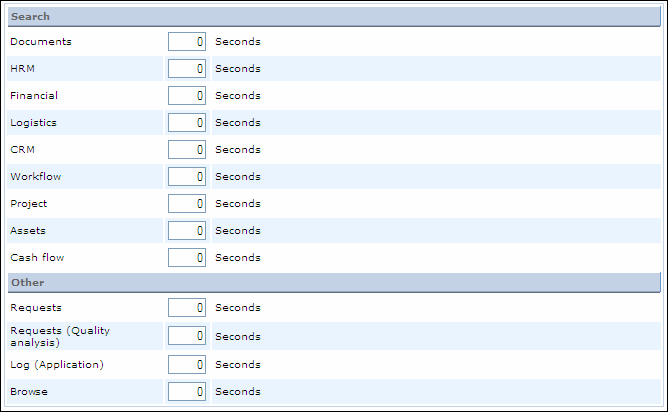
Search section
Documents
Type the maximum duration in seconds for a search query in the Documents module.
HRM
Type the maximum duration in seconds for a search query in the HRM module.
Financial
Type the maximum duration in seconds for a search query in the Financial module.
Logistics
Type the maximum duration in seconds for a search query in the Logistics module.
CRM
Type the maximum duration in seconds for a search query in the CRM module.
Workflow
Type the maximum duration in seconds for a search query in the Workflow module.
Project
Type the maximum duration in seconds for a search query in the Project module.
Assets
Type the maximum duration in seconds for a search query in the Assets module.
Cash flow
Type the maximum duration in seconds for a search query in the Cash flow module.
Other section
Requests
Type the maximum duration in seconds for a search query on requests.
Requests (Quality analysis)
Type the maximum duration in seconds for a search query on requests (quality analysis).
Log (Application)
Type the maximum duration in seconds for a search query on an application log. For more information, see Application Log Report.
Browse
Type the maximum duration in seconds for a search query for browsers.
Related document
| Main Category: |
Support Product Know How |
Document Type: |
Online help main |
| Category: |
On-line help files |
Security level: |
All - 0 |
| Sub category: |
Details |
Document ID: |
15.157.377 |
| Assortment: |
Exact Synergy Enterprise
|
Date: |
06-12-2010 |
| Release: |
|
Attachment: |
|
| Disclaimer |