PU 508 (Globe+): France outgoing e-Invoice overview and e-reporting submission (French legislation)
In this product update, a new e-reporting functionality for the French legislation has been introduced in Exact Globe+. A new outgoing e-Invoice menu has been added, providing a centralised location for you to monitor outgoing e-Invoice statuses and manage e-reporting obligations. The feature enables organisations to view the processing status of submitted B2B domestic e-Invoices and manage transaction and payment reporting for foreign B2B and B2C transactions in accordance with French e-reporting requirements.
New outgoing e-Invoice menu path
The menu path has been introduced to provide a workspace for e-invoicing and e-reporting activities.
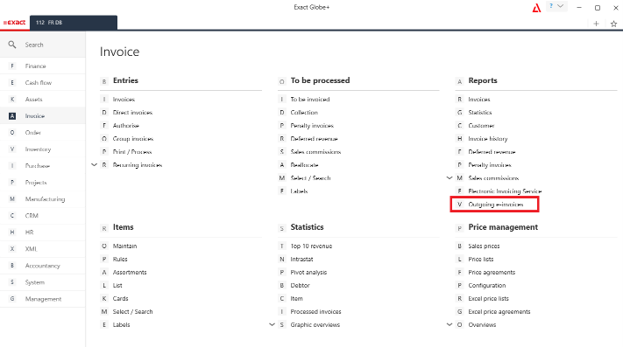
Note: To ensure accurate data in the e-reporting (CDAR and transaction or payment data), do not use VAT mixed mode (normal VAT for goods and cash-based VAT for services) in a single invoice.
Outgoing e-Invoices screen
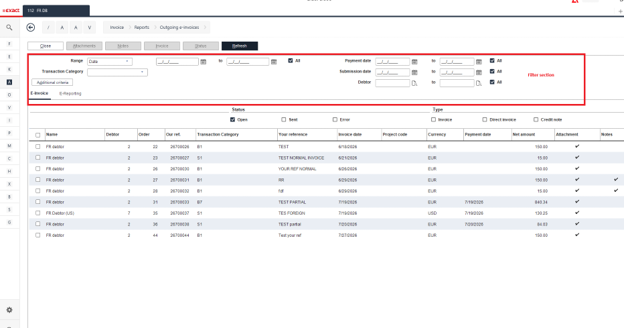
The Outgoing e-invoices screen contains separate tabs for e-Invoice and e-reporting depending on the licenses available. The e-Invoice tab is available when the SE1100 e-Invoice license is active, and the e-Reporting tab is displayed when the SE1077 e-Reporting license is available. This screen allows you to manage reporting records, monitor submission statuses, and review related transaction details.
The e-Invoice tab provides an overview of all finalised domestic B2B invoices that have been generated and submitted as e-Invoices. You can monitor the status returned by the French tax authority and determine whether a submitted invoice has been accepted or rejected. This functionality improves tracking and supports compliance monitoring after the invoice submission process has been completed.
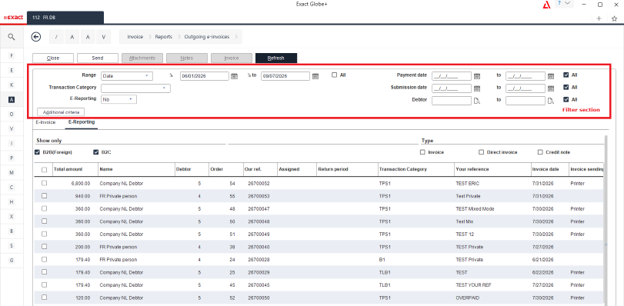
The e-Reporting tab supports the French e-reporting requirements for foreign B2B and B2C transactions that are not covered by mandatory e-invoicing. You can review eligible transactions, manage reporting data, and generate XML files for submission to the tax authority. This tab supports reporting based on user-selected reporting periods and allows you to submit transaction data directly from the application.
New e-reporting setting in invoice codes
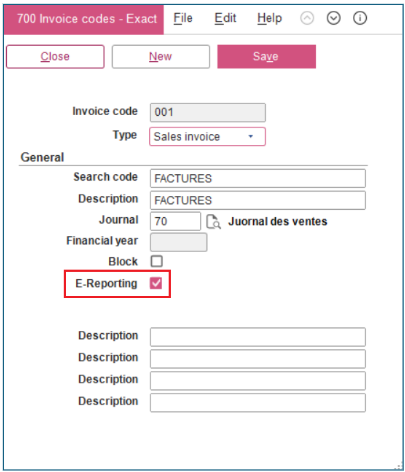
A new E-Reporting checkbox has been added to the Invoice codes maintenance screen. When selected:
- The invoice is available in the Invoice > Reports > Outgoing e-invoices screen.
- The invoice is included when generating e-reporting XML files.
The checkbox is not selected by default and must be selected for invoice codes that will be used for e-reporting processing.
E-Reporting screen
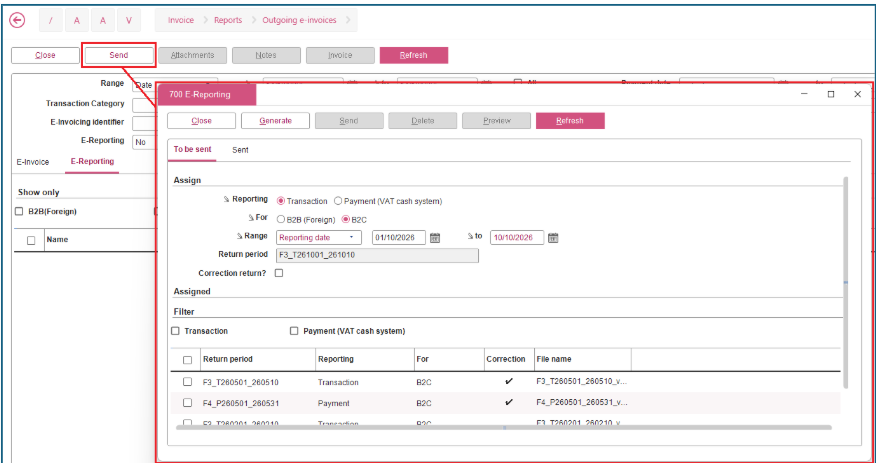
When you click Send in the screen, the E-Reporting screen will be displayed with the following tabs:
Automatic return period generation
When a valid date range is defined, the system automatically generates a return period based on the selected reporting type and reporting category. The generated return period identifies the following:
- Transaction or payment (VAT cash system) reporting
- B2B (foreign) or B2C reporting
- Selected reporting period dates
Return period validation
To prevent duplicate or overlapping submissions, the system validates the selected reporting period with the existing return periods.
- If an identical unsent return period exists, the existing XML file and return period are replaced with a newly generated version.
- If an identical return period has already been submitted, the system automatically creates a correction return.
- If the selected date range overlaps with an existing return period, generation is blocked and an overlap warning is displayed.
Reporting range selection
For transaction reporting, you can choose which date type to use for reporting such as:
- Date
- Reporting date
- Fulfilment date
The selected range preference is remembered for future e-reporting sessions.
Default date range
When the E-Reporting screen is opened, the date range defaults to the period from the1st day of the current month to the 10th day of the current month.
Generate e-reporting XML
You can generate an e-reporting XML file from the To be sent tab. During generation, the following occurs:
- XML files are created and stored automatically.
- E-reporting records are created for tracking and submission.
- The system automatically validates whether the return period should be treated as a correction return and updates the correction setting when necessary.
Submit e-reporting returns
You can submit one or more generated return periods directly to the reporting gateway from the To be sent tab.
Preview generated files
The Preview button allows you to review the generated e-reporting document before submission.
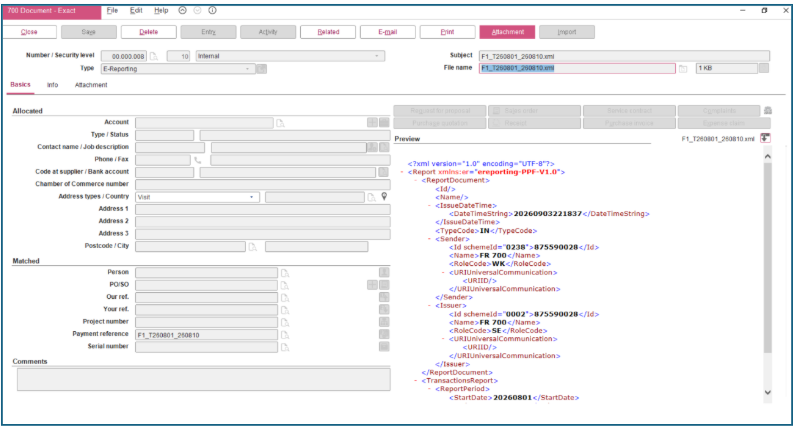
Delete unsent return periods
You can delete generated return periods that have not yet been submitted.
Improved sent return tracking
The Sent tab provides visibility into submitted e-reporting returns. The enhancements include the following:
- Viewing submitted return periods by year and month.
- Filtering records by reporting type and submission status.
- Previewing submitted e-reporting documents.
- Refreshing submission statuses to retrieve the latest response information from the reporting gateway.
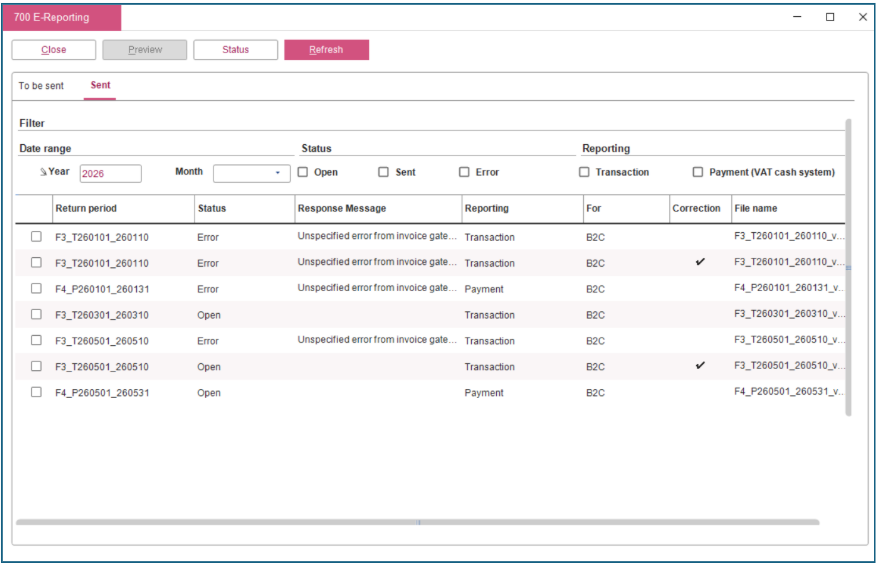
For more information on the E-Reporting screen, see Viewing E-Reporting screen (French legislation).
XML generation for transaction reporting
This release also introduces automated XML generation for French e-reporting submissions. The generated XML files contain transaction information required by French regulations and are created based on the reporting period and filtering criteria. The XML file contains a single header section that identifies the reporting entity and reporting period.
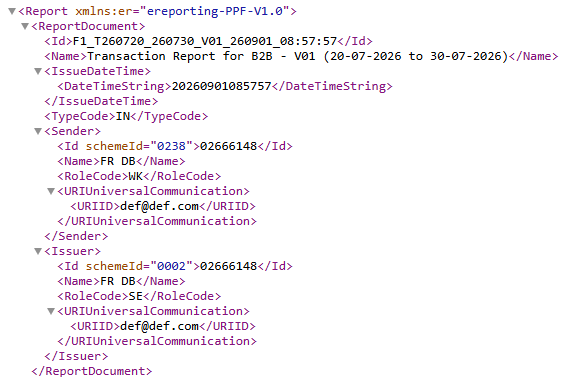
The following transaction reporting formats are supported:
- Flux 10.1 (foreign B2B transaction reporting) – This section contains invoice transaction information for foreign B2B customers. One reporting record will be generated for each qualifying invoice, credit note, or debit note within the selected reporting period.
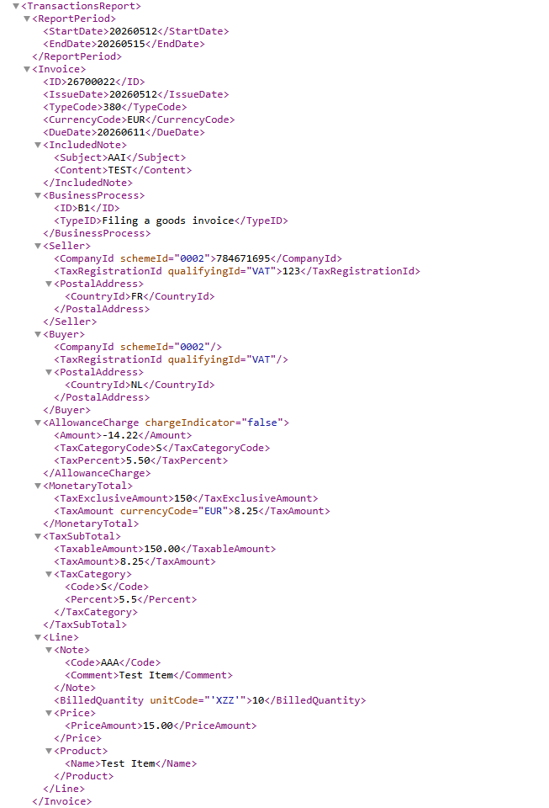
- Flux 10.3 (B2C transaction reporting) – This section contains aggregated transaction information for B2C transactions. Summarised transaction amounts are reported based on the reporting period, currency, and VAT rate. The transaction record will be generated for each unique combination of transaction date, category code, and VAT rate within the selected reporting period.
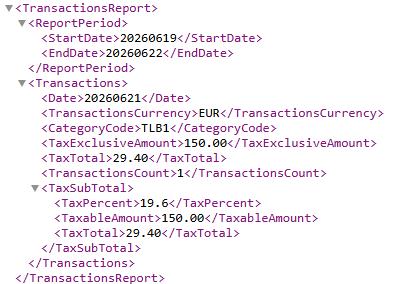
Payment reporting support
The reporting of payments received for previously reported transactions is also supported. Payment reporting is generated only for invoices that have been fully or partially paid within the selected reporting period. The following reporting formats are supported:
- Flux 10.2 (foreign B2B payment reporting) – This section contains payment information for foreign B2B transactions reported under the France e-reporting requirements. The payment record will be generated when a payment is received for a previously reported foreign B2B invoice. The payment date, payment amount, and applicable VAT information are reported.
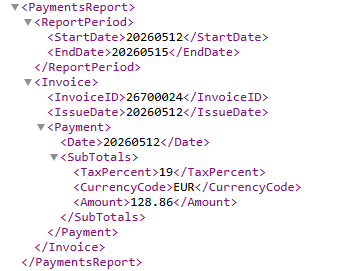
- Flux 10.4 (B2C payment reporting) – This section contains aggregated payment information for B2C transactions. Payments received are reported from consumers during the selected reporting period. Payment information is also reported in a summarised format based on payment date and VAT rate.
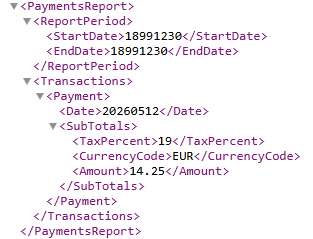
For more information, see E-Reporting in XML for France (French legislation) and Viewing outgoing e-Invoices report.
| Main Category: |
Attachments & notes |
Document Type: |
Release notes detail |
| Category: |
|
Security level: |
All - 0 |
| Sub category: |
|
Document ID: |
33.315.089 |
| Assortment: |
Exact Globe+
|
Date: |
28-10-2026 |
| Release: |
|
Attachment: |
|
| Disclaimer |